Case Study
Avatar
Redesigning a supply chain planning platform to unlock clarity, reduce errors, and empower decision-makers at scale.

Role:
Sr. Product Designer
Timeline:
Oct 2021 – Jul 2025
Methods:
Research · Interaction · Visual · Prototyping

Overview
Avatar puts the best-of-breed concept back on the CIO agenda: with modular functionalities augmenting existing systems such as SAP IBP, completely new planning and decision support features, and benefits from our latest-technology integration approach.
My Role
Sr. Product Designer
User Research · Interaction · Visual design · Prototyping & Testing
Oct 2021 – July 2025
Background
A new kind of composable best-of-breed solutions, a hyper-secure and infrastructure-agnostic platform, and pioneering technology: this is the New Wow in Supply Chain Planning.
I joined Avatar as a product designer 4 years ago as one of 2 designers in a company of over 70 engineers and 15 product managers. I support design across every aspect of our business and am responsible for leading UX and UI across key parts of the application.
I've grown tremendously in the last year, some key achievements of which I have listed below:
1
Implemented a design process
Established more structure to how the team conducts work, allowing other teams to gain visibility across upcoming sprints.
2
Improved usability across the platform
Actively introduced UX research and usability testing on all projects — a practice absent from the original external consultancy handoff.
3
Establishing a design kit
Maintained consistency in look and feel across different parts of the platform.
4
Establishing a design system
Helped Engineering and Product teams understand how and why certain components are chosen over others.
Understanding the Problem
Before Avatar had even hired a product design team, an early beta version of the new platform had already been developed by an external consultancy — based purely on high-level, blue-sky concepts — without any usability testing and without consideration for technical constraints or product requirements.
To address this, I conducted research interviews with our primary users — the account managers — to identify the pain points they were experiencing with the beta release.
My research focused on:
Understanding user goals and needs
Identifying pain points across the current user journey
Evaluating how successfully users were able to complete key tasks
Research Methods
💬
Stakeholder Interviews
1-on-1 sessions with 8 account managers
🗺️
User Journey Mapping
End-to-end flow documentation
🔍
Competitor Analysis
Benchmarking against 3 peer platforms
📝
Usability Evaluation
Heuristic review of the beta
Gathering Insights
After collecting recordings from the user interviews, I conducted affinity mapping with my teammate to synthesise the pain points identified. We grouped these problems under common themes and features in the platform — surfacing patterns that shaped our design decisions.
Navigation & Findability
Users struggled to locate key planning modules, leading to repeated backtracks and workflow interruption.
Data Entry & Validation
Manual input without inline validation caused frequent errors and tedious correction cycles.
Information Overload
Dense screens with no hierarchy made it difficult to extract actionable insights quickly.
Designs
High Fidelity Mocks
Each screen was designed following extensive research, wireframing, and usability testing — translating complex supply chain workflows into intuitive, task-focused interfaces.
Screen 1
Login & Sign Up
A clean, dual-panel authentication experience. The right panel provides a focused login form with SSO support, while the left showcases the platform's live supply chain intelligence network — reinforcing trust and setting the product tone from first contact.

Screen 2
Launchpad
The central hub after login. Users see all active suites, live alerts categorised by severity, world clocks, and software update status in one glance. Quick Access shortcuts and the Discover More panel let any persona orient and act immediately.
Suite status at-a-glance
Severity-graded alert triage
Contextual quick access

Screen 3
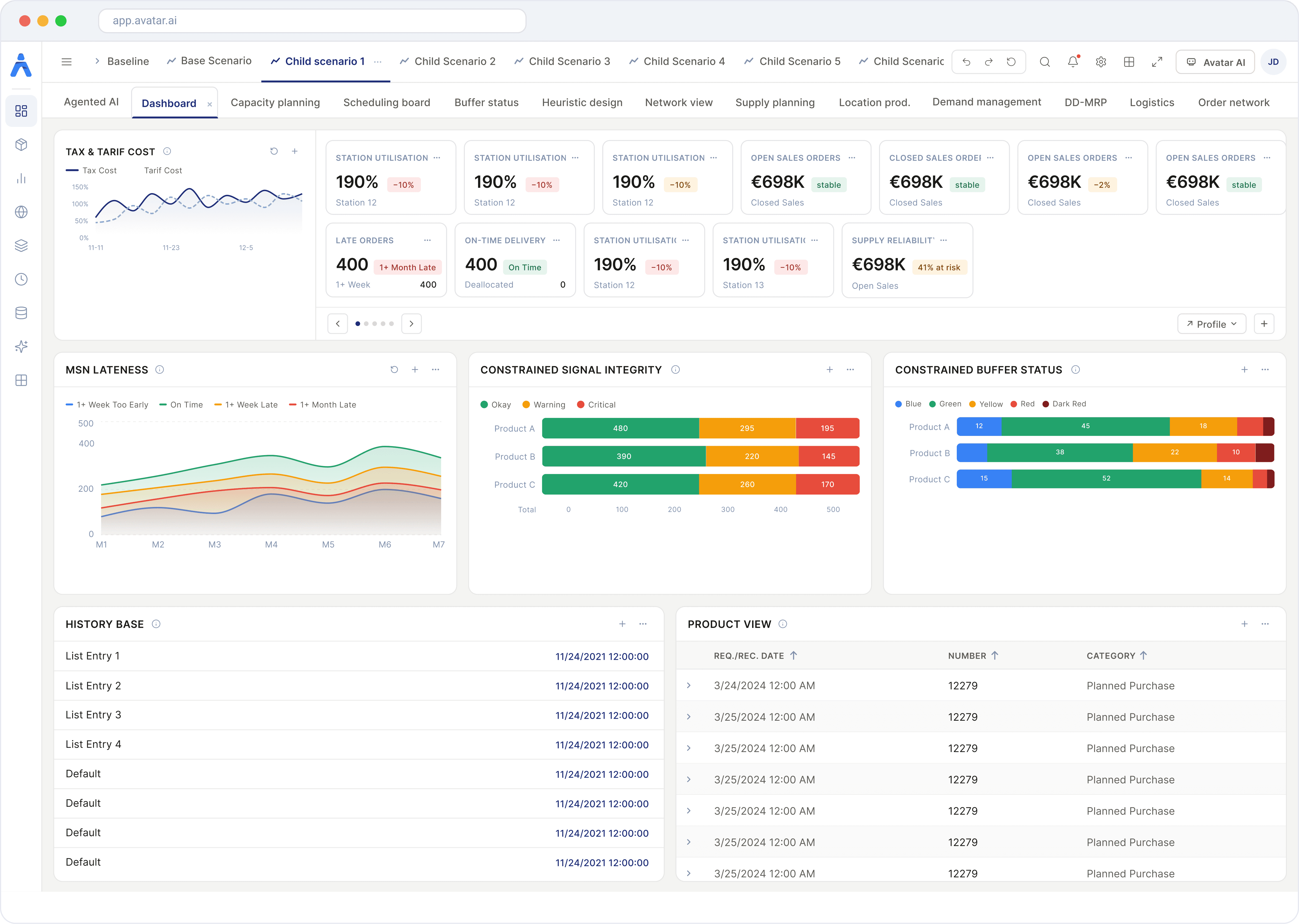
Planning Dashboard
The analytical heart of the planning suite. KPI tiles, MSN lateness trends, constrained signal integrity charts, buffer status, and product view data all coexist in a modular, configurable layout — enabling demand planners and directors to act on the same interface at different zoom levels.
Highlights
Configurable widget layout
Multi-KPI overview tiles
Constrained vs. unconstrained buffers
Screen 4
Product View
A powerful data-grid experience for planned purchase orders, adaptable to three display densities. Comfortable mode gives planners breathing room, Compact maximises row density, and Excel View brings spreadsheet familiarity — with the added intelligence of ATP status, pegging view, and state tagging.
Highlights
Three density modes
Inline state tagging (FIRMED, MTO, PULL-IND)
Pegging view pop-over
Comfortable
Compact
Excel View

Screen 5
DD-MRP Buffer Management
Demand-Driven Material Requirements Planning made visual. Planners filter by location, product, and scope to review net flow and on-hand status across constrained and unconstrained scenarios. A donut chart provides an instant macro view of buffer zone distribution.
Highlights
Constrained vs. unconstrained split
Multi-location filtering
Buffer zone donut summary

Screen 6
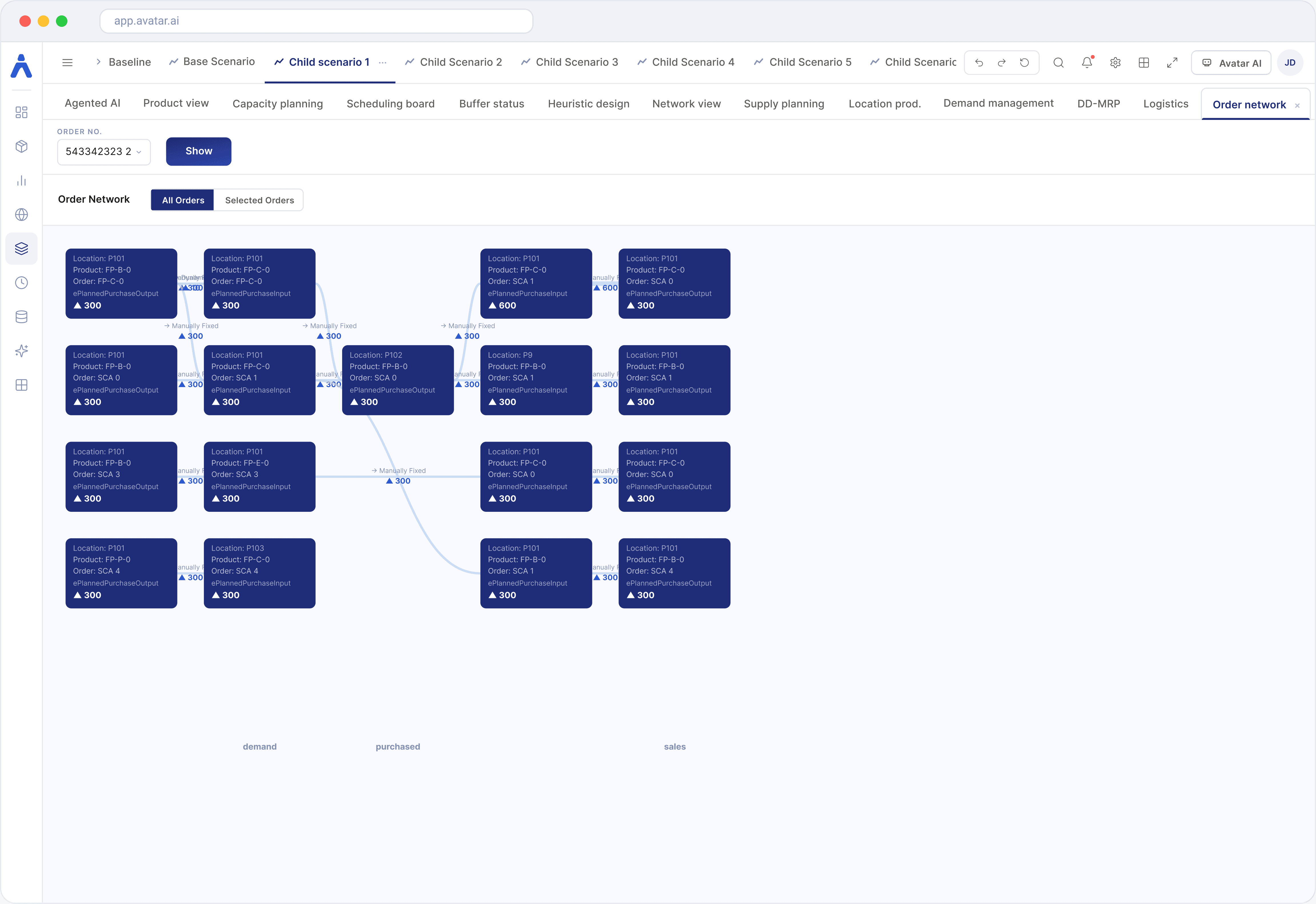
Order Network
A visual graph of the entire order chain — from demand nodes through purchased and production nodes to sales output. Each card displays location, product, order type, and quantity delta, giving procurement specialists a transparent end-to-end signal path for any order number.
Highlights
Full order chain graph
Demand → Purchased → Sales flow
Node-level order card detail
Screen 7
Scheduling View
A Gantt-based production scheduling board that overlays capacity utilisation directly on the timeline. Planners track order lateness, buffer status, and weekly capacity across products in a single scrollable view — surfacing conflicts before they become disruptions.
Highlights
Gantt + capacity utilisation overlay
Buffer status KPI strip
Order lateness categorisation

Measurable Outcomes
Impact at a Glance
Rigorous user testing and data-backed iteration delivered measurable improvements across every key performance dimension.
Task Completion Time
40%
Streamlined flows cut the average time to complete core planning tasks significantly.
Faster Onboarding
3
×
A redesigned new-user journey collapsed ramp-up from weeks to days.
Components
200
+
Alpha Design System — a comprehensive library powering the entire platform.
Reduction in Errors
58%
Contextual validation and structured input patterns eliminated data-entry mistakes.
Usability Tests Conducted
15
+
Usability sessions conducted across user groups throughout the project lifecycle.

Award Winner
Red Dot Design
Recognized for outstanding UX/UI excellence in supply chain planning software.
Results and Takeaways
Key learnings from the Avatar design journey — principles that shaped how we approached each challenge and continue to guide our work.
1
Strategic MVP Launch
Developing a strategic plan for an MVP ensures that the project stays on track, prevents scope creep, and delivers a quality product within the set timeline. Focusing on essential features first allows for faster deployment while addressing user needs effectively.
2
Continuous User Testing
The design process is an ongoing iteration. Post-launch user feedback is invaluable — always find ways to collect insights and refine the user experience to ensure it remains relevant and user-centric.
3
Involve Engineering Early
Bringing engineering into the process from the outset helps mitigate future rework and ensures that technical constraints are well understood. This collaboration aligns design strategy with practical implementation, leading to smoother development cycles.
4
Award-Winning Design Excellence
The success of Avatar's UX/UI design is reflected in its recognition with the prestigious Red Dot Award, highlighting the company's ability to optimize supply chain processes through an intuitive, user-friendly interface.

DISCOVER
Research
Create
Diverging
Interviews
User research
Competitor analysis
Feature mapping
Assumptions
Hypothesis
Coverging
Diverging
Coverging
DEFINE
IDEATE
IMPLEMENT
Dashboard
Create problem
statement
User Stories
Lean UX
Workshop
LOFI
Wireframes
Prototype
Prototype
Iteration
SME
SME
User Testing
Functional
Workshop
Hi-Fi Design &
Dev.
A double diamond approach — diverging to explore the full problem space, then converging to define and deliver focused solutions.
UX Process
methodology
User Personas


Primary Users

© 2026. All rights reserved.
Muhammad Inzimam Saghir